


Pikmin Bloom Desperately Needs a Performance Update in 2026


We’ve come a long way since the launch of Pikmin Bloom. Over the past four years, the game has received a number of incredible updates, new features, and hundreds of new Decor Pikmin to collect. That said, in terms of the game’s performance and how well it’s able to function on certain devices, it leaves a lot to be desired.
The last time the Niantic team (recently acquired by Scopely, Inc.) made a dedicated update specifically to improve the game's performance was in May of 2023.
Since then, each new update has only seemed to add to the problems many players are facing. While the game is as fun as ever, it is riddled with visual and audio bugs, excessive battery drain and overheating, and constant lagging, freezing, and crashing to varying degrees depending on what kind of device you use.
It’s well beyond time for Niantic and Scopely to have another round of performance updates to tackle the game’s many bugs and poor optimization with a focus on the issues that harm the gameplay experience.

My name is Johnny, and along with Gianni, we run a YouTube channel called Bloom Buds, which is dedicated to talking about Pikmin Bloom.
We are official members of the Niantic Content Creator Program where we have two main roles: first, to provide information and clarification about new game updates from Niantic to the player base, and second, to report feedback about game content to the developers so they can improve the gameplay experience.
After seeing countless people discuss the game’s problematic performance increasingly over the years, we decided to create a survey to see if we could gather data on these issues and the range of devices that they affect.
Our goal was to pass on concrete data to the developers so that they can be pointed in the right direction to potentially address them. There’s no guarantee they will actually acknowledge or take action based on the information, but at the very least, it will give players some insight on these issues and how to best avoid them.
Here are some examples of performance-related bugs and issues that players frequently encounter:
Here, all flowers planted on the map become bright magenta, and menu text and icons become pixelated.
Sometimes Mii characters hang out in places they shouldn’t be!
Pikmin Bloom drains battery excessively compared to other similar apps.
Here a player’s mushroom breaks indefinitely until the game is refreshed.
Phantom Pikmin sometimes consume nectar without actually consuming it.
The Planter Pack can sometimes be viewed from strange angles.
Sometimes Pikmin get the zoomies when they bring back expedition items.
Pikmin models often display stretched out when viewing from the storage menu.
There are many more bugs and glitches like this that are often encountered by the player.
With 526 responses to the survey, let’s first talk about the battery drain issues. When answering the question, “Which performance issue frustrates you the most?”, excessive battery drain was the top choice with 33.1%.
In my own experience, I have also felt that my phone heats up excessively and the battery drains rapidly when playing Pikmin Bloom, even for a short time, so I decided to put this to the test.

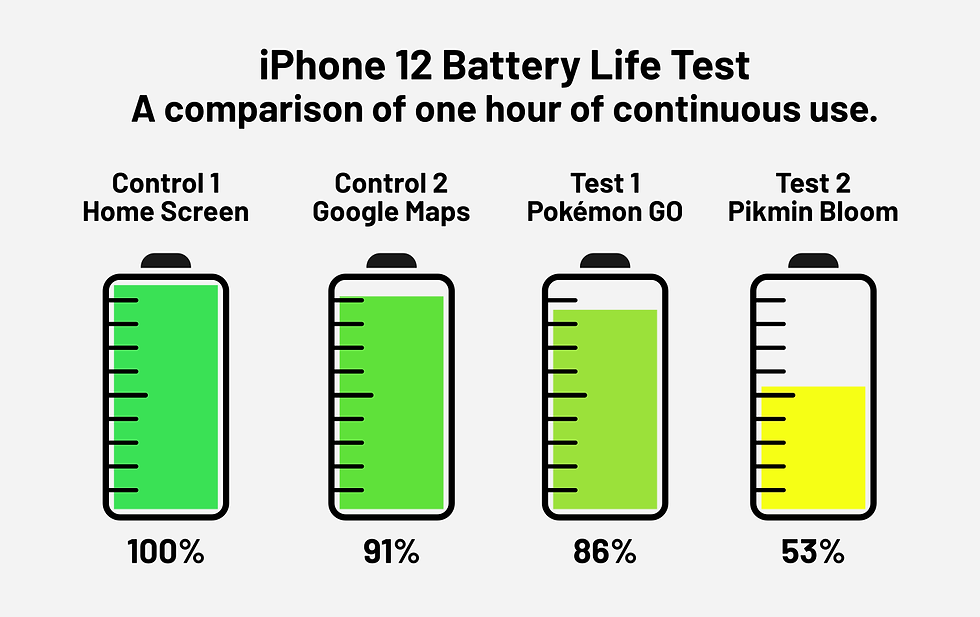
I designed an experiment to see how using Pikmin Bloom affects the battery life of my iPhone 12 by running various apps and then recording the decrease in battery percentage after one hour of continuous use, making sure to charge to 100% after each trial. All other settings, such as screen brightness, were kept the same between each round.
Hypothesis: When compared to Pokémon GO, Pikmin Bloom will lose significantly more battery life. The control groups will result in the lowest battery percentage loss.
The first control group was simply idling on my phone’s home screen without any other inputs. The second control was opening Google Maps without doing anything to see how a non-game app that uses GPS technology would influence battery life.
Next, I actively used Pokémon GO as if mimicking regular gameplay by spinning a Pokéstop and using incense to catch all Pokémon that spawned for an hour. Finally, for Pikmin Bloom, all I did was start flower planting and kept the game open without any other inputs for an hour.
As you can see from the results below, the home screen surprisingly retained its full 100% battery life. For Google Maps, 91% remained, while Pokémon GO resulted in 86%. Those are all well within the range of what I would consider to be expected of each app. Unfortunately, Pikmin Bloom ended with 53%, faring significantly worse than the other trials. Clearly, something desperately needs to be done to improve the situation if the phone’s battery was drained by about half in just one hour.
Finally, we asked participants if they had ever experienced a consequence due to the game’s performance, and 65.3% of respondents answered “Yes”.
The most frequently cited issues were missing out on joining mushroom battles due to lag or game crashes, the GPS not functioning properly impacting flower planting, accidental purchases or use of items that were triggered due to lag, and missing out on unique game experiences due to freezing or crashing, such as seeing a Decor Pikmin’s shadow being filled in for the first time.

We love Pikmin Bloom and want the game to be the best it can be.
The developers have shown time and time again that they do listen to feedback and implement solutions if enough people bring an issue to light. We can confirm that both the results of the survey as well as our video analyzing the results were passed on to the Pikmin Bloom developers. Naturally, we are unable to comment on any internal discussion nor can we promise whether the problems will be addressed in the future or not. All we can say is that it has been shared internally. The ball is in their court.
However, there is one important thing all players can do to help the situation:
Whenever you come across a problem in-game, whether it be a visual bug, game crash, excessive lag, GPS issue, or other problem, we strongly encourage all players to actively report the experience in-game and post issues on the official Pikmin Bloom Support Community page.
In my opinion, these are the two most important actions an individual can take in shining a light on these issues, as they give the developers an idea of how many people are being affected and provide more information about how to fix the problem. Most people air their complaints across community channels such as Discord, Twitter, and Reddit, but it’s better to move that kind of discussion to official platforms such as the Pikmin Bloom Support Community website, where the staff is more likely to see it.
How To Contact Support to Report a Problem:
Settings ➡ Help ➡ Contact Support ➡ Reporting and Feedback
In conclusion, if the developers don’t think many players are experiencing problems, they are more likely to be oblivious of issues the game is facing. If you experience 10 problems in one day and you don't report anything to support, then from their perspective, it looks as if everything is running smoothly. Many players have become complacent with the bugs and performance issues and have opted to ignore them as they appear. It’s up to us as players to make sure we don’t become complacent. Be relentless in reporting issues you come across, and together we can bring Pikmin Bloom to its greatest possible potential!
Here’s to a long and healthy future for Pikmin Bloom!
- Bloom Buds Johnny
If you’d like to see the information yourself, you can check here for the full raw survey data.
For a more detailed breakdown and analysis of the data, you can check out our video, “Pikmin Bloom’s performance issues are getting out of hand.”
Written by Johnny (Bloom Buds)


Comments